Oracle just released its newest version of Oracle Data Access Components (ODAC) that incudes support for Entity Framework 4.0. You can read more about this release here http://www.oracle.com/technetwork/topics/dotnet/whatsnew/index.html. You can also read this article about usage of ODP (Oracle Data Provider) with Entity Framework models http://www.oracle.com/technetwork/issue-archive/2011/11-sep/o51odt-453447.html
One important note is that Code First is not officially supported in this release, and will be supported in a future release. Having said that, I wanted to see if I can use it, since Code First builds on top of EF 4, which is supported by this release. I was able to confirm that I can indeed access Oracle data and update it.
Here are step-by-step instructions.
You will need one prerequisite – Oracle engine itself. I used 11g Express edition, which is free for developer. You can download it from this page
http://www.oracle.com/technetwork/database/express-edition/downloads/index.html
Event those it is not required, I also installed Sql Developer, which is akin to SQL Server Management Studio, well mostly anyway. You can download it from this page
http://www.oracle.com/technetwork/developer-tools/sql-developer/downloads/index.html
Once that is done, download and install ODAC from here
http://www.oracle.com/technetwork/topics/dotnet/whatsnew/index.html
At this point, I ran SQL Developer, connected to my instance and looked at the existing database. You have to create a new connection for that, using File – New..->Database Connection menu. Under Other Users node I found HR, which contains a sample HR database.
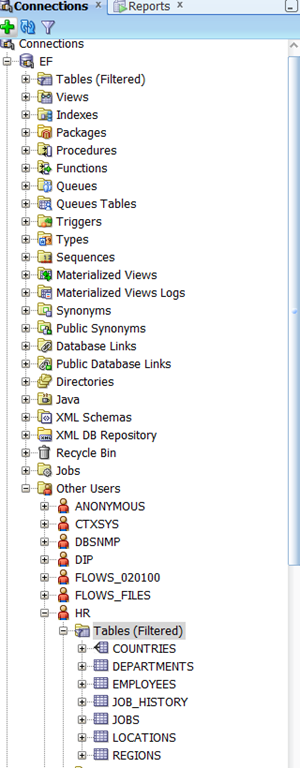
Personally, I reset password for HR user to something that I know. This way I do not have to use SYS login.
Now that those tasks are out of the way, you are ready to get started. I assume you already have VS 2010 installed.
Now, start new project (I used Console application) and install Entity Framework Code First package reference into this project. You can use NuGet for that, which is what I did. Also add a reference to Oracle ODP assembly – Oracle.DataAccess. Then, I create a POCO class to match Countries table and setup DbContext. I use fluent API to configure that table. I just do it in the context class instead of creating a separate configuring class. Here is my country class.
public class Country
{
public string CountryID { get; set; }
public string CountryName { get; set; }
public decimal RegionID { get; set; }
}
And here is DbContext class:
public class Context : DbContext
{
public Context()
: base(new OracleConnection(ConfigurationManager.ConnectionStrings["OracleHR"].ConnectionString), true)
{
}
public DbSet<Country> Countries { get; set; }
protected override void OnModelCreating(DbModelBuilder modelBuilder)
{
base.OnModelCreating(modelBuilder);
modelBuilder.Conventions.Remove<IncludeMetadataConvention>();
modelBuilder.Entity<Country>().Property(p => p.CountryID).HasColumnName("COUNTRY_ID");
modelBuilder.Entity<Country>().HasKey(p => p.CountryID);
modelBuilder.Entity<Country>().Property(p => p.CountryName).HasColumnName("COUNTRY_NAME");
modelBuilder.Entity<Country>().Property(p => p.RegionID).HasColumnName("REGION_ID");
modelBuilder.Entity<Country>().ToTable("COUNTRIES", "HR");
}
}
Now, you have to setup connection string in app.config:
<?xml version="1.0"?>
<configuration>
<connectionStrings>
<add name="OracleHR"
connectionString="DATA SOURCE=localhost:1521/XE;PASSWORD=****;PERSIST SECURITY INFO=True;USER ID=HR;"
providerName="Oracle.DataAccess.Client" />
</connectionStrings>
<startup>
<supportedRuntime version="v4.0" sku=".NETFramework,Version=v4.0" />
</startup>
</configuration>
Here is the code that gets data from the table and inserts a new row.
using (var ctx = new Context())
{
var data = ctx.Countries.ToList();
ctx.Countries.Add(new Country() { CountryID = "CL", CountryName = "Chile", RegionID = 2 });
ctx.SaveChanges();
}
Here are a few important points.
- Make sure to put correct password into connection string.
- I configure column names explicitly to match the database table.
- I had to use correct .NET types to match the Oracle data types. Here is MSDN article that describes this mapping http://msdn.microsoft.com/en-us/library/yk72thhd.aspx
- I am manually creating Oracle Connection and passing it into constructor of my context class. I tried to avoid that, but I kept getting exceptions. This approach worked perfectly.
In summary, one apparently can use newest Oracle provider to use with Code First. This approach is not officially supported by Oracle, at least not yet. So, use it at your own risk. You definitely cannot create new database as you can in SQL Server, so you have to maintain database separately. From my research, only DevArt provides full Code First support for Oracle with their own provider, at least according to their product page http://www.devart.com/dotconnect/entityframework.html
You can download my sample solution http://DotNetSpeak.com/Downloads/EFOracle.zip
[Update 2/12/2012] – this scenario is not officially supported by Oracle, so you should not use this in production.
Thanks, and feedback is appreciated.
Agreed.. I never rename the columns.. its good to name them properly..
Hi! Nice Article. Thanks.
Could you send me an example when the Country has a “Active” Boolean Property, please? The Column type is NUMBER(1,0) in the database, but I don’t know how can I implement the conversion NUMBER to Boolean?
Thanks!
It seems the provider does not handle automatic conversions between NUMERIC(1,0) and bool. One workaound I can suggest is to define a constant for 1 and 0 and do the following:
var data = ctx.Countries.Where(c=>c.IsActive == 1).ToList(); // where 1 would be your constant
{
public class Country
{
public string CountryID { get; set; }
public string CountryName { get; set; }
public decimal RegionID { get; set; }
public byte IsActive { get; set; }
}
modelBuilder.Entity().Property(p => p.IsActive).HasColumnName(“ACTIVE”);
Oh, nothing could be simpler. 🙂
Thanks.
I’m trying this in my project, but get “Unable to determine the provider name for connection of type ‘Oracle.DataAccess.Client.OracleConnection'”. Any ideas what might be the cause of this?
Thank you for the sample code, It finally worked for me.
1. I needed my application to work with SQL and Oracle at the same time. Mapping fields one by one will separate my application into two versions?
2. Should i use Oracle 10g to have Code First working as it does with SQL Server?
This is just my opinion, but I would not use Code First for that without testing a provider you picked very thoroughly. Oracle does not support Code First officially, and thus you will not get support from then if you encounter issues. You can try DevArt and see if it works for you. To my knowledge, DevArt is the only provider that advertises Code First support. If you would like to minimize the risk, you can always go with DB First approach and just make sure your models are compatible (read DB are compatible as well). Then you can isolate data access layer into a single DLL, and simply have your business layer refer to this DLL by name. Then have your two projects with your models (one for SQL Server, the other for Oracle) have exact same name and namespace so that you can distribute one or the other depending on your target.
Sergey, Please help!
I have two classes.
public class Customer
{
public int Id { get; set; }
public string Username { get; set; }
public int? JobtitleId { get; set; }
public virtual Jobtitle Jobtitle {get; set;}
}
public class Jobtitle
{
public int Id { get; set; }
public string JobtitleName { get; set; }
}
protected override void OnModelCreating(DbModelBuilder modelBuilder)
{
modelBuilder.Conventions.Remove();
modelBuilder.Entity().ToTable(“CUSTOMER”, “MYSCHEMA”);
modelBuilder.Entity().HasKey(c => c.Id);
modelBuilder.Entity().Property(c => c.Id).HasColumnName(“ID”);
modelBuilder.Entity().Property(c => c.Username).HasColumnName(“USERNAME”);
modelBuilder.Entity().Property(c => c.JobtitleId).HasColumnName(“JOBTITLEID”);
modelBuilder.Entity().HasOptional(c => c.Jobtitle).WithMany().HasForeignKey(c => c.JobtitleId).WillCascadeOnDelete(false);
modelBuilder.Entity().ToTable(“JOBTITLE”, “MYSCHEMA”);
modelBuilder.Entity().HasKey(j => j.Id);
modelBuilder.Entity().Property(j => j.Id).HasColumnName(“ID”);
modelBuilder.Entity().Property(j => j.JobtitleName).HasColumnName(“JOBTITLENAME”);
base.OnModelCreating(modelBuilder);
}
when I add a new customer and call SaveChanges() I have an error.
var customer = new Customer(){Username = “John”};
_db.Customers.Add(customer);
_db.SaveChanges();
error: Object cannot be cast from DBNull to other types.
When I remove ‘public virtual Jobtitle Jobtitle’ property from Customer it’s works. Save a new customer to database with JobtitleId null value.
Some customer has Jobtitle and some hasn’t. Can you help me?
Thanks.
@SeatDevil
Could you please inlcude script for those two tables?
Thanks.
I solved the problem 🙂
I changed the int ID to decimal, and add ‘HasDatabaseGeneratedOption(DatabaseGeneratedOption.Identity)’ string to modelBuilder and it works fine.
Thank you.
Thanks, This article help me specially for the connection string for Oracle.
Can you tell me if it’s possible to have an MVC web application using Oracle database and the DATABASE FIRST approach : generating my data model (.edmx) from an existing oracle database (700+ tables!) ??? how can I generate my data model?
@KrazyNeg
Although code first works, I would be very careful when it comes to using something in production that is not officially supported by Oracle. You can certainly reverse engineer the model by creating an edmx from your database, then using DbContext template to create Code First model. You simply right click on the mode and select Add Code Generation Item, then pick DbContext template. If you do not see that option, just download the appropriate template from VS Gallery, but I think VS 2010 ships with that one.
Hello Sergey,
Nice example.
But is code first now already fully supported by the beta ODP driver?
Thanks in advance.
Gertjan Smit
One more question 🙂
Is lazy and eager loading fully supported?
@Gertjan Smit
I have not tried, but I fully expect they are.
Hello, Sergey Barskiy.
i use entity framework 5 . but get ‘No MigrationSqlGenerator found for provider ‘Oracle.DataAccess.Client’. Use the SetSqlGenerator method in the target migrations configuration class to register additional SQL generators.’
when i update database.
i installed the oracle odp latest edition and oracle client 10g.
Thanks.
@bigboy
Indeed Microsoft only ships SQL Server migrations provider. You can either write your own by implementing required interfaces or wait for Oracle to implement the same. Alternatively, you can use a third party product to maintain your database schema separately from EF classes.
Hi Sergey,
Thanks for the interesting post. I’m looking for a possibility to support the oracle sequences in EF. So possibility to use the select seq_xxx.nextval in linq. I do not want to create at trigger on insert in oracle to handle the id’s. Do you have any idea how to do this with ODP.
Thanks a lot.
@Luc,
I think you would need to execute SQL with your sequence code before you save and put the value into your primary key property. DbContext has method to Execute arbitrarily SQL you can use.
Excellent article, very clean and usefull, thanks.
any updates in 2013 using VS 2012, ODP.NET ?
Not as far as I know. They are releasing managed driver soon though, it is in beta now. That might change a few things, but not the Code First supports as far as I know.
Thank you!!!!! Your solution finally helped me.
I don´t know why, but the context-constructor was able to establish the Connection, the naming convention – as I usually do it – failed …
Segey, I have a problem with the OracleProvider they show me this message of error ‘Unable to determine the DbProviderFactory type for connection of type ‘Oracle.DataAccess.Client.OracleConnection’
I saw this message, but never if I send the connection to the DbContext’s constructor. Is this what you are doing? This should have improved in EF 6, but Oracle still does not have support for Code First officially.
any updates using VS 2013, ODP.NET Managed Driver ?
No official support from Oracle for Code First yet.
Hi,
I m using The code Give above but getting following error.
A null was returned after calling the ‘get_ProviderFactory’ method on a store provider instance of type ‘Oracle.DataAccess.Client.OracleConnection’. The store provider might not be functioning correctly.
I have latest ODAC
Sorry I m new to MVC and I have to use MVC with oracle only..
Thanx in advance.
@Vishal
I am not sure at this point, just not enough information. Make sure you have client installed that matches your web site platform – 32 vs 64 bit. Check your machine.config to ensure Oracle provider is there. Look for inner exception to get more clues. Doublecheck your connection string….
Thanks a lot sir. It works for me.
please can you text the oracle entity provider in web.config
@Info. I am not sure what you are asking here.
For all those who are asking about Oracle DataAccess Provider configuration, You need to add below configuration on config file,
Hi Sergey,
Great to see some nice info in this blog !! It is really helpful !
I am also trying to use Entity Framework code first approach for oracle data source. but after trying for a week now I am not getting any success in retrieving the data. I have tried using Entity Framework 4.2.0.0 & 5.0.0.0 with .net framework 4.5 , latest odac components & odp manager.
the issue is improper query eg.
Query : SELECT
“Extent1″.”EmployeeId” AS “EmployeeId”,
“Extent1″.”DepartmentId” AS “DepartmentId”,
“Extent1″.”RelatedEntityFqdn” AS “RelatedEntityFqdn”,
“Extent1″.”EmailAddress” AS “EmailAddress”
FROM “schemaname”.”EMPLOYEE” “Extent1”
here first thing you notice is ‘From’ section, it is taking schema name & table name in double quotes while in normal scenario it should be without quotes.
and the second thing is column names, in that too it is taking double quotes while it should not. so can you tell the exact cause of the issue? and what do i need to do so that entity framework generates proper query for oracle?
Apart from that, i would also like to know the specific versions that are supported for Entity Framework code first approach for Oracle.
It will be a great help from your side if i get to the some solution.
Thanks in advance !!!
EF is using quoted identifiers because this is the only way to be safe. You probably need to use explicit table and column names in configurations to ensure they match Oracle. Maybe even schema name as well.
Hi Sergey, Nice to see your quick response !!
I have also tried giving column names, table name & schema name explicitly but didn’t get any success 🙁 , it is still generating the query with double quotes so it gives me “table or view does not exists” error. and i have tried many workarounds but still not getting rid of that double quotes so can you suggest any approach through which entity framework would generate correct query for oracle?
Thanks in advance !!
As I mentioned before, quoted identifiers are used for safety, you cannot suppress them as far as I know. However, if you supply correct schema names, column names, and table names in you mapping configuration classes, your query will work just fine.
Hi Sergey,
I am facing some issues related with mapping the boolean property with oracle database.
The description of the exception is as follows :
Error : Schema specified is not valid. Errors: (27,12) : error 2019: Member Mapping specified is not valid. The type ‘Edm.Boolean[Nullable=False,DefaultValue=]’is not compatible with ‘OracleEFProvider.number[Nullable=False,DefaultValue=,Precision=38,Scale=0]’
I had tried to add the following code in the project’s config file.But still didnt worked
Can you you help me out with this?
Thanks in advance !!
I am guessing you are using large numbers as booleans ind you DB. You have to teach EF provider how to map those. For example you can do this in your config file.
You can also opt to just use numbers in your model.
Sergey,
I am getting the following error while connecting to Oracle 11G Database with ASP.NET MVC4 and EF 5.
Error: A null was returned after calling the ‘get_ProviderFactory’ method on a store provider instance of type ‘System.Data.OracleClient.OracleConnection’. The store provider might not be functioning correctly.
Web.Config ConnectionString Details:
I am guessing you did not install oracle data provider ODP / ODAC on your machine. Or you are not using managed provider.
base(new OracleConnection(ConfigurationManager.ConnectionStrings[“OracleHR”].ConnectionString), true)
in above line of code configurationManager is showing error that , this is not in context
@ummidikondababu. Maybe you are not referencing System.Configuraion? Hard to say without seeing full error text.
Hi Sergey,
Need your help !!! Again 🙂
I am trying to use Entity Framework code first approach for oracle data source.Now for security purpose we are not using connection string from web config, rather using a variable while initializing context class, like,
public class EmployeeContext : DbContext
{
public EmployeeContext()
: base(DbConnection)
{
Database.SetInitializer(null);
}
etc…etc…
Here “DBConnection” variable contains the connection string.
Now with oracle, I need to give provider name along with the connection string otherwise it throws error so can you please tell me the way to tell DBContext about which Provider Name to use?
Thanks in advance !!
@Nirav
Should be Oracle.DataAccess.Client, assuming you have ODP installed. You can look it up in machine.config under system.data.
I can’t download Oracle Express 11g in my country, Cambodia. Can anyone help me?